API/Reference
Gaussian
PSFModels.gaussian — Function
gaussian([T=Float64], point; x, y, fwhm, amp=1, theta=0, bkg=0)
gaussian([T=Float64], px, py; x, y, fwhm, amp=1, theta=0, bkg=0)
An unnormalized bivariate Gaussian distribution. The position can be specified in (x, y) coordinates as a Tuple, AbstractVector, or as separate arguments. If theta is given, the PSF will be rotated by theta degrees counter-clockwise from the x-axis. If bkg is given it will be added as a scalar to the PSF.
The fwhm can be a scalar (isotropic) or a vector/tuple (diagonal). Keep in mind that theta has no effect for isotropic distributions and is degenerate with the fwhm parameters (i.e., theta=90 is the same as reversing the fwhm tuple)
Functional form
\[f(x | x̂, \mathrm{FWHM}) = \exp[-4 \ln(2) ⋅ ||x - x̂|| / \mathrm{FWHM}^2]\]
where x̂ and x are position vectors (indices) ||⋅|| represents the square-distance, and FWHM is the full width at half-maximum. If FWHM is a scalar, the Gaussian distribution will be isotropic. If FWHM is a vector or tuple, the weighting is applied along each axis (diagonal).
PSFModels.normal — Function
normalAn alias for gaussian
gauss = gaussian(x=0, y=0, fwhm=10)
psfplot(gauss, -50:50, -50:50; title="gaussian(fwhm=10)",
        colorbar_scale=:log10, clims=(1e-5, 1))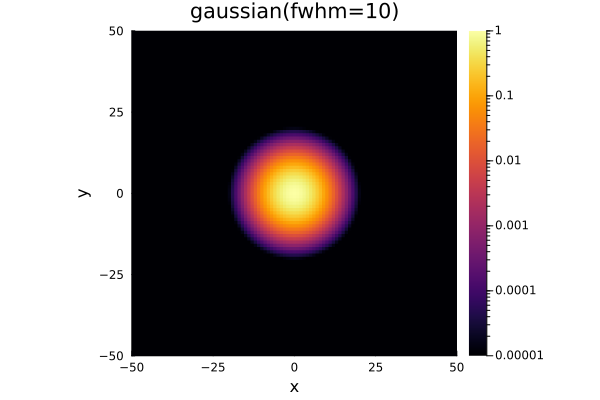
Airy Disk
PSFModels.airydisk — Function
airydisk([T=Float64], point; x, y, fwhm, ratio=0, amp=1, theta=0, bkg=0)
airydisk([T=Float64], px, py; x, y, fwhm, ratio=0, amp=1, theta=0, bkg=0)
An unnormalized Airy disk. The position can be specified in (x, y) coordinates as a Tuple, AbstractVector, or as separate arguments. If theta is given, the PSF will be rotated by theta degrees counter-clockwise from the x-axis. If bkg is given it will be added as a scalar to the PSF.
The fwhm can be a scalar (isotropic) or a vector/tuple (diagonal). Keep in mind that theta has no effect for isotropic distributions and is degenerate with the fwhm parameters (i.e., theta=90 is the same as reversing the fwhm tuple)
If ratio is supplied, this will be the Airy pattern for a centrally-obscured aperture (e.g., a Newtonian telescope). This has a slightly expanded functional form, and in general the central Airy disk will be smaller and the first Airy ring will be brighter.
Functional form
The Airy disk is a distribution over the radius r (the square-Euclidean distance)
\[f(x | x̂, \mathrm{FWHM}) = [ 2J₁(q) / q ]^2\]
where J₁ is the first-order Bessel function of the first kind and
\[q ≈ π r D / λ ≈ π r / (0.973 × \mathrm{FWHM})\]
If user a non-zero central obscuration via ratio, the functional form becomes
\[f(x | x̂, \mathrm{FWHM}, ϵ) = [ 2J₁(q) / q - 2ϵJ₁(ϵq) / q ]^2 / (1 - ϵ^2)^2\]
where $ϵ$ is the ratio ($0 ≤ ϵ < 1$).
airy = airydisk(x=0, y=0, fwhm=10)
psfplot(airy, -50:50, -50:50; title="airydisk(fwhm=10)",
        colorbar_scale=:log10, clims=(1e-5, 1))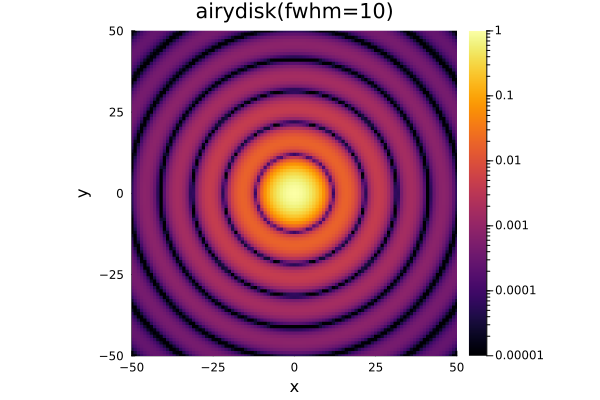
airy_obscured = airydisk(x=0, y=0, fwhm=10, ratio=0.3)
psfplot(airy_obscured, -50:50, -50:50; title="airydisk(fwhm=10, ratio=0.3)",
        colorbar_scale=:log10, clims=(1e-5, 1))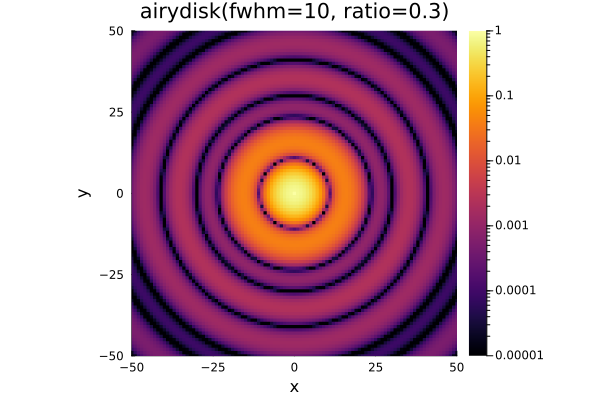
Moffat
PSFModels.moffat — Function
moffat([T=Float64], point; x, y, fwhm, alpha=1, amp=1, theta=0, bkg=0)
moffat([T=Float64], px, py; x, y, fwhm, alpha=1, amp=1, theta=0, bkg=0)
Two dimensional Moffat model. The position can be specified in (x, y) coordinates as a Tuple, AbstractVector, or as separate arguments. If theta is given, the PSF will be rotated by theta degrees counter-clockwise from the x-axis. If bkg is given it will be added as a scalar to the PSF.
The fwhm can be a scalar (isotropic) or a vector/tuple (diagonal). Keep in mind that theta has no effect for isotropic distributions and is degenerate with the fwhm parameters (i.e., theta=90 is the same as reversing the fwhm tuple)
Functional form
\[f(x | x̂, \mathrm{FWHM}, α) = A (1 + (||x - x̂|| / \mathrm{FWHM} / 2)^2)^{-α}\]
where x̂ and x are position vectors (indices) ||⋅|| represents the distance, and FWHM is the full width at half-maximum. If fwhm is a vector or tuple, the weighting is applied along each axis.
Note that this function technically uses the half width at half-maximum, defined as $\mathrm{HWHM} = \mathrm{FWHM}/2$, but for compatibility with the other models, fwhm is used as an input parameter instead.
moff = moffat(x=0, y=0, fwhm=10)
psfplot(moff, -50:50, -50:50; title="moffat(fwhm=10)",
        colorbar_scale=:log10, clims=(1e-5, 1))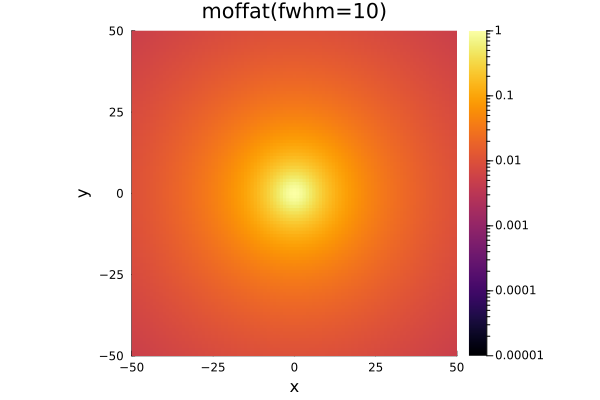
moff2 = moffat(x=0, y=0, fwhm=10, alpha=2)
psfplot(moff2, -50:50, -50:50; title="moffat(fwhm=10, alpha=2)",
        colorbar_scale=:log10, clims=(1e-5, 1))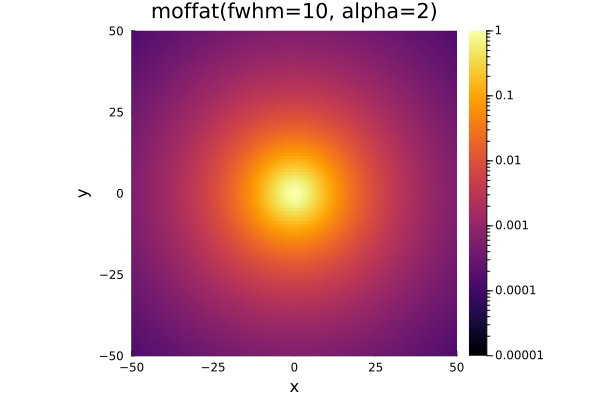
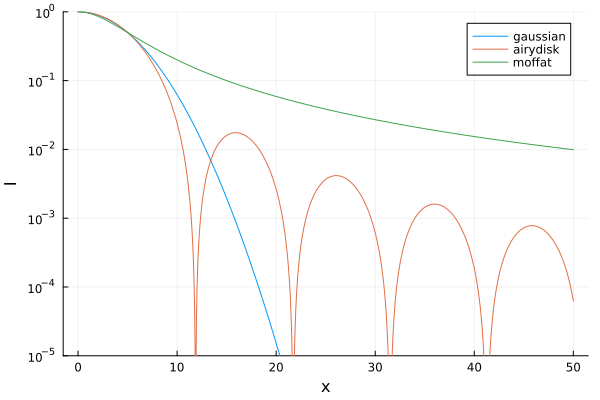
Comparison
xs = range(0, 50, length=1000)
plot(
    xs, [gauss.(xs, 0) airy.(xs, 0) moff.(xs, 0)],
    label=["gaussian" "airydisk" "moffat"], yscale=:log10,
    xlabel="x", ylabel="I", ylims=(1e-5, 1)
)
Fitting
PSFModels.fit — Function
PSFModels.fit(model, params, image, inds=axes(image);
              func_kwargs=(;), loss=abs2, maxfwhm=Inf,
              alg=Optim.NewtonTrustRegion(), inv_var=nothing,
              kwargs...)
Fit the parameters of a PSF model (model) with initial guess params. This model is fit to the data in image at the specified inds (by default, the entire array). Inverse variance data weights can be passed via the inv_var keyword argument, which should be the same size as image if provided. The best-fitting parameters are returned as a named tuple, along with the best-fitting model. If inv_var is provided, the covariance matrix of the best-fitting parameters is also returned.
To pass extra keyword arguments to the model (i.e., to "freeze" a parameter), pass them in a named tuple to func_kwargs. The default loss function is the chi-squared loss, which uses the the square of the difference (i.e., the L2 norm). You can change this to the L1 norm, for example, by passing loss=abs. The maximum FWHM can be set with maxfwhm as a number or tuple.
Additional keyword arguments, as well as the fitting algorithm alg, are passed to Optim.optimize as an Optim.Option. By default we use forward-mode auto-differentiation (AD) to derive Jacobians for the Newton with Trust Region optimization algorithm. Refer to the Optim.jl documentation for more information.
Arguments
model::Model: the PSF model to fit, e.g.,gaussianormoffatparams: a named tuple of the parameters to fit and their default values, e.g.,(x=20, y=20, fwhm=3)image::AbstractMatrix{T}: the data to fit the model toinds: the indices of the data to fit to, by default the entire array
Keyword arguments
func_kwargs: a named tuple of extra keyword arguments to pass to the model; this enables freezing a parameter, e.g.,(fwhm=3)loss: the loss function to minimize, by defaultabs2, the chi-squared loss (L2 norm)maxfwhm: the maximum FWHM, can be a number or tuplealg: the optimization algorithm to use, by defaultOptim.NewtonTrustRegion()inv_var: inverse variance weights on the inputimage; if provided, must be the same size asimage, and the covariance matrix of the best-fitting parameters will be returnedkwargs: additional keyword arguments passed toOptim.Options
Returns
P_best: a named tuple of the best-fitting parametersbest_model: the best-fitting model, for direct comparison with the input data
If inv_var is given, also returns:
cov: the covariance matrix of the best-fitting parameters. Standard errors on the parameters can be estimated assqrt.(LinearAlgebra.diag(cov)).
Choosing parameters
The fit function is very powerful because it gives you a great amount of flexibility in the way you fit your models. To demonstrate this, let's start with a simple isotropic gaussian.
model = gaussian
# match params to arguments of PSF
params = (x=20, y=20, fwhm=3, amp=1)
Note that params can follow any order
params = (amp=1, x=20, y=20, fwhm=3)Now, to extend this interface to the bivariate PSF case, where fwhm is two values, all you need to do is use a tuple or vector
params = (x=20, y=20, fwhm=(3, 3))and, again, the order does not matter
model = moffat
params = (alpha=1, x=20, y=20, fwhm=3, amp=10)
Fitting a PSF
After selecting your model and parameters, fitting data is easy
P = (x=12, y=13, fwhm=13.2, amp=0.1)
psf = gaussian.(CartesianIndices((1:25, 1:15)); P...)

params, synthpsf = PSFModels.fit(gaussian, P, psf)
here params is a named tuple of the best fitting parameters. It will not include any fixed parameters.
synthpsf is the best-fitting model, for direct comparison with the input data.
psf_fit = synthpsf.(CartesianIndices(psf))To alter parameters without fitting them (i.e., "freeze" them) use func_kwargs
P = (x=12, y=13, fwhm=(12.4, 13.2), amp=0.1)
func_kwargs = (alpha=2)
params, synthpsf = PSFModels.fit(moffat, P, psf; func_kwargs)